Store design
Style your cart to match the rest of your store
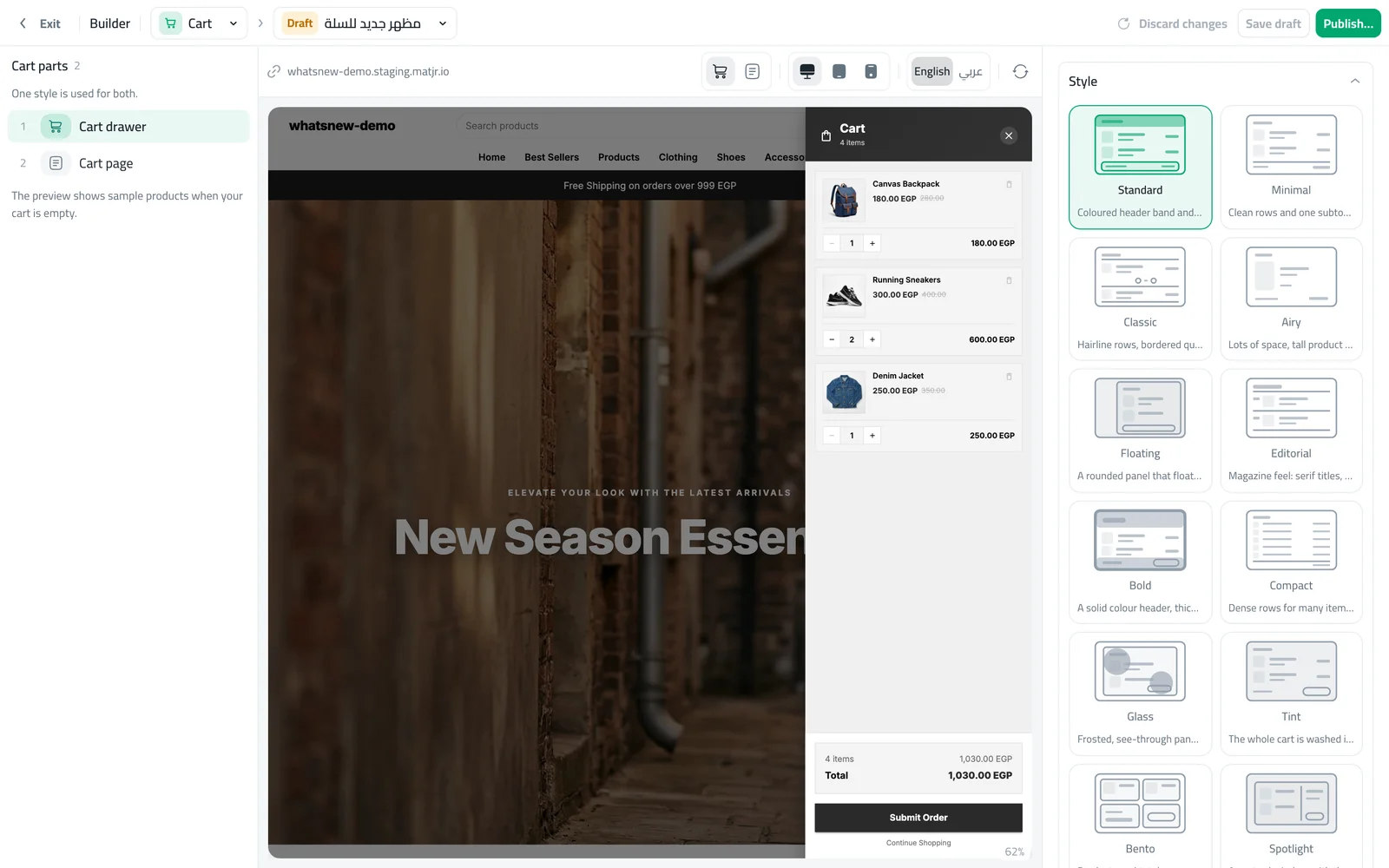
Choose one of 12 cart styles for the cart drawer and cart page, set their colours, and decide where the order summary sits.
- Where
- Design › Cart
- Styles
- 12, shared by the drawer and the cart page
- Also
- Colours and order summary position
The cart is the last step before checkout. When it looks like the rest of your store, shoppers feel at home and are more likely to finish their order.
What changed
The Cart page in the builder lets you pick one of 12 styles. One style is used for both the cart drawer and the cart page. You can set separate colours for each, and choose whether the order summary sits beside or below the products on computers. The cart also loads more smoothly, without blank moments.
How to use it
In the builder, choose Cart. Switch the preview between the drawer and the cart page, pick a style, then publish.
Frequently asked questions
Does the cart style change checkout?
No. Your checkout form, shipping and payment options stay the same.
Can the drawer and the cart page look different?
They share one style, but each can have its own colours.
Is there a cost?
No. Cart styles are included in every plan.
Try it on your own store
Start your free trial. No credit card required.